 Log In
 Register

 Topic RSS
 Facebook
 Twitter
 Email this
7:55 am
July 18, 2013
 Offline


Just tried to use the Oaken (aka Home Bank) website to purchase their 2-year GIC, currently being promoted at 4%. A rep was on the phone line with me at the time, as I tried to fill out the form.
At one point in the process, the user has to use a drop-down menu to choose their province of residence. There were 4 provinces listed, none of them in Canada. One was the name of a province in Afghanistan. I logged out, turned off my computer, and used another method to purchase the GIC.
The rep, who I think was legit, said he was reporting it to their IT dept.
For the time being, I won't be using any websites to conduct any kind of banking... not knowing whether it was me who had been hacked, or Oaken.
What think ye?
8:44 am
December 20, 2016
Offline
How did you initiate the contact with Oaken on this occasion? Did you click on a link in an email solicitation, receive a telephone call or did you do a search engine (Google, Bing etc) search for Oaken?
If you used a search engine, was the link you chose at the top of the listings, perhaps as a sponsored listing?
These are the usual methods employed by malicious actors to trap unsuspecting internet users to connect users to a look-alike website where the user enters critical banking information.
To protect yourself, first determine the actual website address of the institution, in the case of Oaken the homepage is https://www.oaken.com/en-ca/ from which you cannavigate to the login page.
The homepage address along with the login page address should then be saved in you own bookmarks or better still in your password manager, so that when you access the institution, you ALWAYS use your own bookmarked URL address and NEVER use a link provided by a search engine or an email.
BTW Oaken requires 2 factor authentication for logging in, so if you were logged into your oaken account without having to be authenticated, you were on a fake website.
Commendations for noticing something was not right and for following your intuition.
Stephen
9:11 am
July 18, 2013
Offline
Thanks for the helpful information, Stephen. I used a search engine, but I don't remember whether I clicked on a sponsored link or not...I used to be an IT professional (decades ago), so I really should have been more like my 'cautious' handle when I was logging in. Aaarrgh!
There was no 2FA...so I must have been on a fake website as you say...filling in GIC purchase info....double Aaarrgh!
Now what do I do? (That's a very pained whimper you're hearing.)
Brenda
9:30 am
April 6, 2013
Offline

Can't be certain it was a fake site or the real site without the URL used.
The top sponsored Google search results for "Oaken" and "Oaken GIC" just now do go to the real Oaken site.
Does Oaken do two-factor authentication every login? Some financial institutions only do it when they detect a new device or new location.
I would call the real Oaken to see if they have any record of that previous call you made for your initial attempt to purchase the GIC.
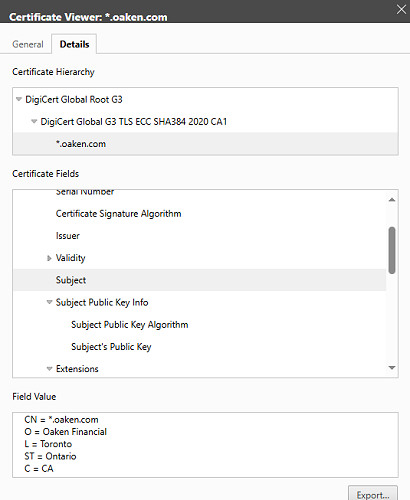
Check the certificate for the site. The real Oaken site uses a certificate issued by DigiCert to "Oaken Financial, Toronto, Ontario, CA":
9:56 am
December 20, 2016
Offline
cautious said
Now what do I do?
Brenda,
In this environment, sometimes even experienced IT people can be deceived. Don't beat yourself up!
Perhaps your best be might be to telephone Oaken and have a CSR set up the investment you need: 1-855-OAKEN-22 (625-3622)
However, if you follow the homepage URL to navigate to the login page, you would be secure. Perhaps also do a full system scan to ensure the integrity of your computer.
Stephen
12:20 pm
July 18, 2013
Offline
Thanks to Stephen and Norman1 for the feedback.
2FA was not required when I logged in from my laptop to Oaken yesterday to check balances... neither was it today, when I was scammed with what could be a fake website.
After speaking to Oaken again it turns out that Oaken uses 2FA only when a login is, in their words "fishy", though how much a CSR would know about the nitty-gritty of digital security is questionable to my mind.
The same CSR, however, just told me that he had seen similar incidents of both County and Province faulty drop-down option sets earlier this week, with similar exotic populating; he thought it was the bank's back-end IT boffins messing up.
Hmmm.
Looking back through my browser history, I believe this is the link I used to log in to my Oaken account, and start filling out the GIC application form:
https://www.oaken.com/open-an-.....oQQAvD_BwE
But once I was logged in, there were several side trips through the internet space to check stuff...I really can't be sure where I was when I started filling out the GIC application form.
I don't use a password manager and store as little autocomplete info on my devices as possible; that's one of my own security practices. Maybe I should consider changing that.
So I've had Oaken lock digital access to my account, in the faint hope that might have some positive affect. Though that won't do a thing if the scammer has already harvested my info.
A full scan by Norton came back squeaky clean. But I'm guessing that also presents little evidence that the scammy harvesting of my data was prevented.
Oaken has escalated this to their Financial Crimes Investigation Unit.
I'm going to build a cabin in the woods, grow my own food, live off-grid, and quit the world of digital banking...maybe any banking...probably starve to death eaten alive by Lyme-carrying ticks while I'm at it....
6:49 pm
December 18, 2024
Offline
I bought a 4% GIC a couple of hours ago....no issues.
I only logon to FI's and others from "MY" bookmarks. I never use a link from a legitimate email from any FI or utility.
@cautious
Time for a new Password for sure.
Consider if not already, to set up your alerts. Both my wife and I receive alerts by email and text no matter who logs on.

3:10 am
November 18, 2017
Offline
cautious: Kudos for remembering to check your browsing history for the URL! That's what I was going to suggest. It looks like it was okay, though. Did you enter a lot of info before pulling the plug on the application? Fortunately, most web site authoring tools don't actually ingest the info until the forms are submitted.
For what it's worth, I live in Vancouver and always visit our downtown Oaken office to set up new GICs. The same rep has been there for years.
RetirEd
7:58 am
December 18, 2024
Offline
cautious said
Just tried to use the Oaken (aka Home Bank) website to purchase their 2-year GIC, currently being promoted at 4%. A rep was on the phone line with me at the time, as I tried to fill out the form.At one point in the process, the user has to use a drop-down menu to choose their province of residence. There were 4 provinces listed, none of them in Canada. One was the name of a province in Afghanistan. I logged out, turned off my computer, and used another method to purchase the GIC.
The rep, who I think was legit, said he was reporting it to their IT dept.
For the time being, I won't be using any websites to conduct any kind of banking... not knowing whether it was me who had been hacked, or Oaken.
What think ye?
I do believe the country drop down starting with Afghanistan is there when you update your personal information? I am sure I have seen it in the past on the Oaken website.
Just by chance have you logged on, satisfactorily to you, and see if the GIC process is waiting to be finished off? Not sure of the exact words….but you can pause and resume the process.
6:36 am
March 15, 2019
Offline
"A rep was on the phone line with me"
This will sound like a terrible question but let's get real, if we are allow.
Question: How was the rep's English and/or French?
5:33 pm
December 18, 2024
Offline
COIN said
"A rep was on the phone line with me"This will sound like a terrible question but let's get real, if we are allow.
Question: How was the rep's English and/or French?
lol. That's an issue 40% of the time Oaken and Peoples. Very very hard to understand and you have to fill in the blanks yourself....not good!!
1:26 am
November 18, 2017
Offline
I've had calls to both Oaken and Peoples with representatives who had accents, but they were still very much on the ball. They aren't like poorly outsourced outfits like phone and cable companies.
In the case of Oaken and Peoples, it's mostly the newbies that either don't know things or have to ask for help. I often get someone who says, "You can't do that!" when I have regularly done "That." They usually thank me for helping them learn from the supervisors.
RetirEd
6:50 am
March 15, 2019
Offline
Thanks for treating my question like mature, intelligent, rational and civilized adults. That is too often not the case in all chatrooms. I say no more.
8:46 am
July 18, 2013
Offline
Thanks, COIN, for your reflection on 'accents'. The rep's speech was accented, but showed better grammar and usage command than I'm capable of myself, most of the time.
I'm sure he was a rep: although I was already online filling out the form at the time I was speaking with him, I initiated the call myself, from my own records of the correct telephone number. (Though that doesn't explain why the screens he was seeing seemed to be slightly different from the ones I was struggling with.)
I've been busy for several days now, locking accounts, cancelling cards, changing online credentials....closing the barn door after the horses, or maybe just unicorns, have fled. Still more bulwarking to do...with Equifax and TransUnion.
I say 'maybe just unicorns' because I've had 3 different CSRs from 3 different institutions now tell me that drop-down fields not infrequently get improperly populated by the IT boffins. But GIC-Fanatics explanation makes most probabilistic sense, and thank you Fanatic for offering it: Afghanistan is often the country first listed, so naturally the associated provincial dropdown would reference Afghan provinces. Yours truly probably just omitted to choose Canada before skipping over to Province of Residence....
